
您对当前的Blender流体模拟器感到沮丧吗?您是否厌倦了无数小时的渲染,还是发现您的模拟看起来仍然不真实?您是否喜欢在Blender中工作,但发现需要逼真的流体效果时必须使用其他软件?
不再等待!有一个绝佳解决方案,那就是FLIP Fluids!
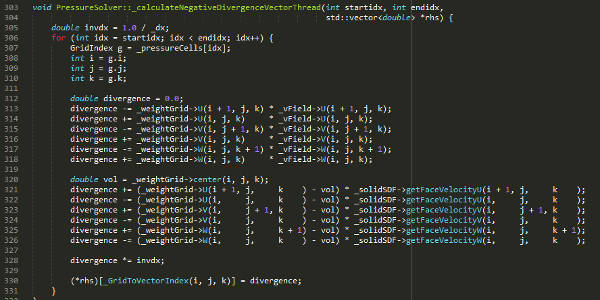
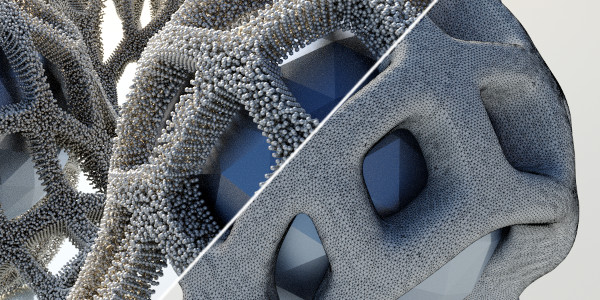
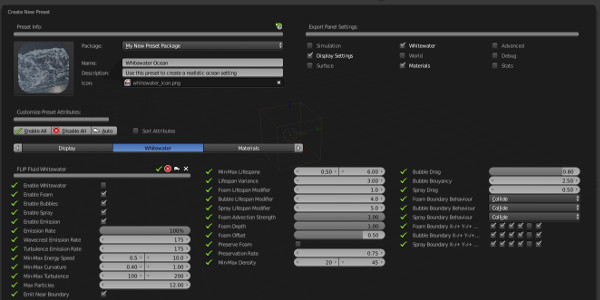
FLIP Fluids 是一个功能强大的液体模拟插件,可让您在Blender中创建高质量的电影流体效果!由Ryan Guy和Dennis Fassbaender创建。核心流体引擎是一种现代的基于FLIP的流体求解器,已经开发了四年多,而过去两年的开发致力于将模拟器紧密集成到Blender中作为附加组件(插件)。
FLIP Fluids模拟器的创建是为了改进Blender内部Elbeem流体模拟系统的许多方面,例如速度,性能,准确性,可定制性和用户体验。我们使用熟悉且直观的模拟工作流程,因此,如果您有使用内部流体模拟器或其他流体模拟软件的经验,便可以立即使用FLIP Fluids进行安装和运行!
主要特征












系统要求
- Windows,MacOS或Linux操作系统
- Blender 2.79、2.80 *(有问题)、2.81、2.82+
- CPU 64位Intel®或AMD®多核处理器
- 最低8 GB RAM,强烈建议16 GB或更多RAM
*不完全支持Blender 2.80由于Blender 2.80中存在严重错误,因此未完全支持Blender 2.80。使用FLIP Fluids插件时,这些错误可能会导致频繁崩溃。建议使用Blender 2.81或更高版本。
更新了什么
v1.0.8a(2020年3月5日)
- 修复主要错误的修补程序。如果安装了1.0.8版本(2020年3月2日),请下载并更新到此版本
- 修复:渲染完成后,可能导致从白水物体中去除材质的错误
v1.0.8(2020年3月2日)
- For detailed release notes of FLIP Fluids v1.0.8, see our development blog post.
- Version 1.0.8 is fully supported in Blender 2.79, 2.81, and 2.82. Blender 2.80 is not fully supported due to severe bugs that affect the FLIP Fluids addon (See Blender 2.8 Support)
- Updated world scaling system to include two scaling modes: Relative and Absolute (Documentation)
- Options to set Start/End timing values in FLIP Fluid simulation panel have been removed (no longer useful)
- Added operators for copying command line baking/rendering commands to clipboard (Windows Only)
- Operator that automatically launches command line render no longer requires a FLIP Fluids Domain in the scene (Windows Only)
- Removed unsafe cache operators (move/copy/rename) from UI. Use your filebrowser for these operations, which is safer.
- Removed the Compute Chunks setting (automatic/manual) from the FLIP Fluids surface panel (no longer needed)
- Particle Scale will be displayed in red if the value is set to less than 1.0
- Gravity mode (Scene or Custom) in the FLIP Fluid World panel has been changed to a horizontal selector
- Removed optimization and performance settings from FLIP Fluid Advanced panel (no longer needed)
- Fixed: Issue where velocities could be ignored on deformable meshes (Issue #485)
- Fixed: Issue where velocities of animated objects would be ignored if an inverse obstacle was present in the scene
- Fixed: Issue that would cause mesh geometry not to export correctly if the Hide from Viewports object option (monitor icon in outliner) is used
- Potential fix for 1st frame not rendering whitewater particles
- Fixed: Issue where edge split modifiers would not be ignored during mesh export
- Fixed: Incorrect default fluid_surface mesh type for OctaneRender
- Fixed: Issue where the fluid_surface object could become unrecoverable if deleted within the viewport (Issue #483)
- Fixed: Issue where OpenGL point size for particle debugging could not be set in Blender 2.8 (Issue #484)
- Fixed: Issue where special filesystem characters could not be used in object name (Issue #462)
- Fixed: Potential errors if simulation contained over 120 million particles (Issue #477)
- Fixed: Issue where simulation data could become corrupted when running out of storage space
- Fixed: Incorrect frame loading when playback offset set to -1 or 1 (Issue #488)
- Fixed: Compositing uses the wrong cached frame during render (Issue #489)
- Fixed: Potential crashes when rendering example scenes
- Fixed: Issue that could trigger an error during command line baking
- Fixed: Baking error message when switching a FLIP Fluids Domain to another simulation type
- Fixed: Issue that could cause a baking crash if an obstacle object was located entirely outside of the domain
- New Documentation: The Most Important Documentation Topics
- New Documentation: Obstacle Inverse Workflow
- New Documentation: The importance of scale
- New Documentation: How to use Relative and Absolute world scaling in your workflow
- New Documentation: Which meshing offset mode to use
- New Documentation: Why is exporting animated objects taking so long!
- New Documentation: Surface Tension: Estimated Substeps
- New Documentation: Update Documentation: Alembic Support
下载地址
| 插件Addon | 版本 | 下载地址 | 提取码 |
|---|---|---|---|
| Flip Fluids | v1.0.8a | 百度网盘 | 1u96 |
| 城通网盘 | |||









文章评论